
How do I ship my first Taobao purchase to the US by sea?
Send your Taobao orders to the China warehouse address assigned for your sea-shipping route. After check-in, use CAINIAO App to combine parcels, choose sea shipping and pay international shipping to your US address.
Updated
This guide covers forwarding through the China warehouse address assigned in CAINIAO App. If your Taobao order already uses official consolidation or direct shipping, follow that order’s own logistics flow and do not mix the addresses from the two flows. The steps use Taobao sea shipping to the US; see the FAQ for other platforms.
Two addresses for two different stages
- On Taobao: use the China warehouse address assigned in CAINIAO App for your chosen US sea-shipping route, including the exact recipient, phone and identifying details.
- For international delivery: enter your actual US delivery address in the international shipping order in CAINIAO App.
Pay for goods first, shipping later
- At Taobao checkout: pay for the goods and any domestic shipping charged by the seller.
- After warehouse check-in and consolidation: review and pay international shipping in CAINIAO App, including any other charges listed on the order. Paying for the goods does not pay this shipping bill.
Follow these six steps
-
Where to do it CAINIAO App, the official US site or official support
Check your items and US sea-shipping route
Prepare your shopping list and US delivery address. In CAINIAO App, check that the items and address suit sea shipping, and note the route’s warehouse address, charges, delivery time and storage terms.
Ready to move on Your specific items and US address are accepted, and you understand how the sea-shipping charges are calculated.
Get your dedicated China warehouse addressIf you get stuck
If sea shipping is missing or a restriction or charge is unclear, send official support your item links and delivery area. Wait for confirmation before buying.
-
Where to do it CAINIAO App → Warehouse Address; Taobao → delivery addresses
Get your dedicated China warehouse address
On the app home screen, set the destination to the US (top right), then tap “Copy” on the Warehouse Address row. For sea shipping, make sure the address you copy is the one assigned to the sea-shipping route, then save it on Taobao. Check all recipient, phone, address and identifying fields.
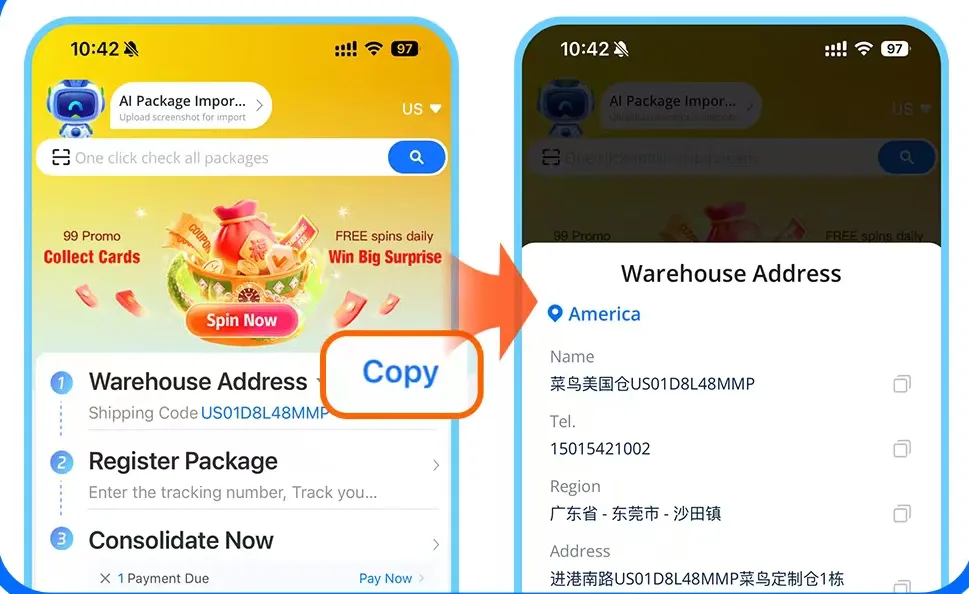
Screenshots from CAINIAO's official new-user consolidation guide. The app may look different. Ready to move on Your saved Taobao address matches the China warehouse address assigned for the current US sea-shipping route. Keep your US delivery address separate.
Order on Taobao and send the goods to the warehouseIf you get stuck
Ask support if you cannot find the sea-shipping warehouse address or map a field to Taobao. Do not use an air-shipping warehouse address assuming you can switch to sea shipping after check-in. Avoid public warehouse addresses found online and keep your US address out of these China address fields.
-
Where to do it Taobao → shopping orders; CAINIAO App → parcel details
Order on Taobao and send the goods to the warehouse
Select your saved China warehouse address, double-check it and pay for the goods. After each seller dispatches, check whether the parcel appears in CAINIAO App. If it does not, follow the app’s instructions to register the parcel using its carrier, tracking number and other required details.
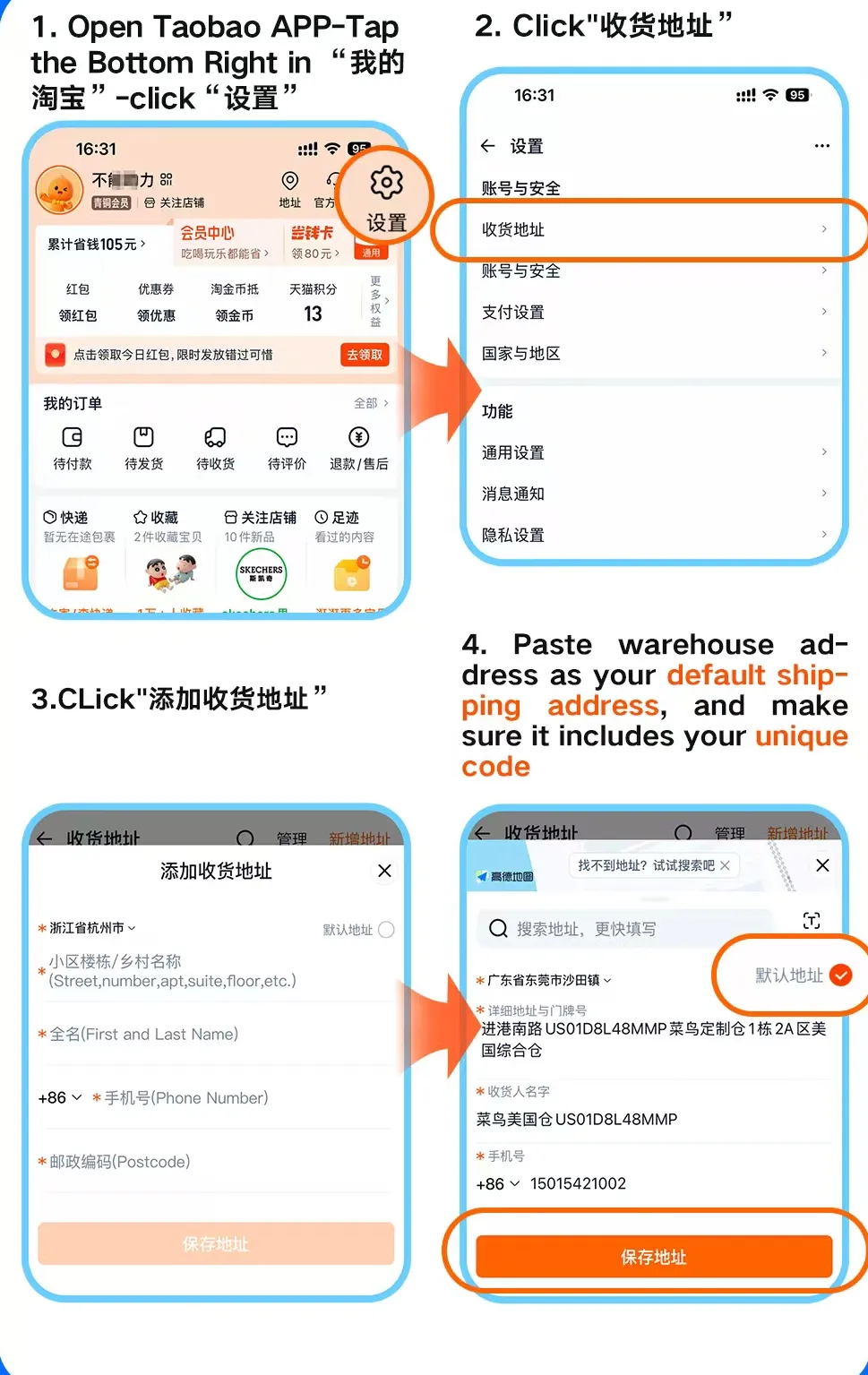
Screenshots from CAINIAO's official new-user consolidation guide. The app may look different. 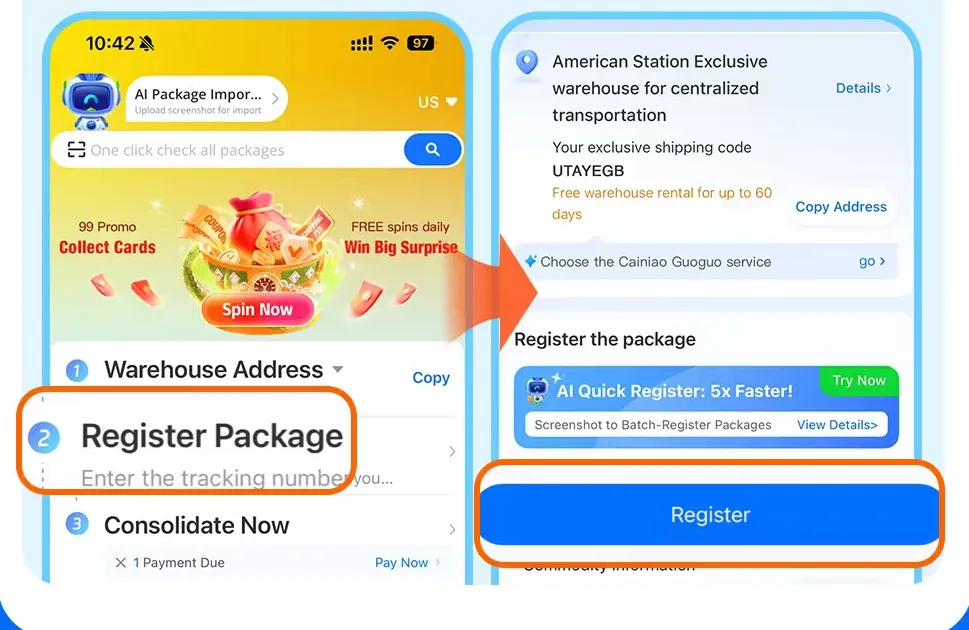
Screenshots from CAINIAO's official new-user consolidation guide. The app may look different. Ready to move on The Taobao order has the correct address, and each dispatched parcel’s tracking number matches its record in the app.
Wait for warehouse check-in and account for every parcelIf you get stuck
Contact the seller immediately if the order address is wrong. For a missing app record, check the tracking details and ask official support; do not place a second order to fix a syncing issue.
-
Where to do it Taobao → domestic tracking; CAINIAO App → warehouse parcels
Wait for warehouse check-in and account for every parcel
Follow the domestic delivery from seller to warehouse, then check parcel records, quantities, weights and available actions in the app. If shopping at several stores, confirm every parcel you want to send together is checked in. Review storage deadlines and charges too.
Ready to move on All parcels you want to send together show as checked in in the app. A domestic courier’s “delivered” status alone does not confirm warehouse check-in.
Combine parcels and choose sea shipping to your US addressIf you get stuck
If tracking says delivered but the app has no check-in record, give support the tracking number and delivery record. Resolve missing or incorrect parcels before consolidation. If a parcel reached a warehouse for another route, ask support which routes are available; do not assume you can switch to sea shipping.
-
Where to do it CAINIAO App → checked-in parcels and international shipping order
Combine parcels and choose sea shipping to your US address
Tap “Consolidate Now” on the home screen, select the checked-in parcels you want to send together and tap “To Merge”. Enter your US address and choose an available sea-shipping route. Provide accurate item details as requested, then review chargeable weight, shipping, extra charges, tax treatment and estimated delivery.
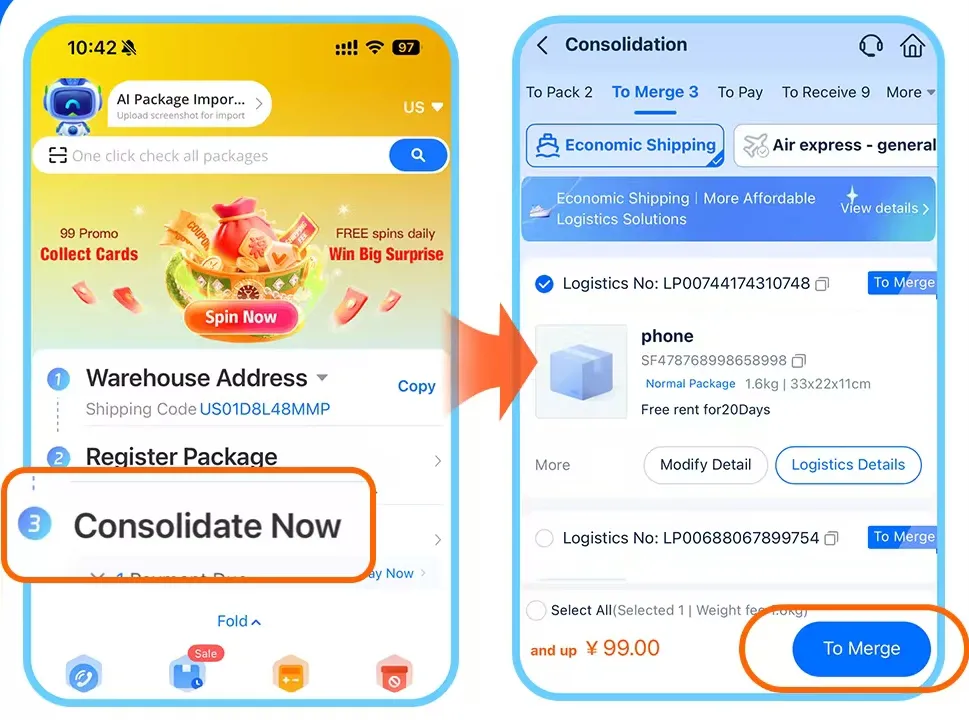
Screenshots from CAINIAO's official new-user consolidation guide. The app may look different. Official CAINIAO promo code Enter it in the promo code field before you pay for shipping for an extra 10–20% off. Combine it with coupons to save more.
USGIFTReady to move on The order awaiting confirmation shows sea shipping, your correct US address and the selected parcels. You understand the itemized charges.
Pay international shipping and track the deliveryIf you get stuck
If sea shipping is missing or disabled, ask support to check this parcel’s warehouse and current route conditions before paying. If the price is unexpected, check chargeable weight and additional charges first.
-
Where to do it CAINIAO App → international shipping order; the carrier’s tracking page
Pay international shipping and track the delivery
Recheck the parcels, sea-shipping route, US address and charges, then tap “Pay Now” on the Payment Due row. Save the international order and tracking details, follow warehouse dispatch, international transport and local delivery updates, and check your parcels when they arrive.
Ready to move on The app confirms shipping payment, followed by tracking updates. The process ends when you receive and check the parcels.
Common first-time questionsIf you get stuck
If a payment result is unclear, check the order or ask official support before paying again. For stalled tracking or a delivery you did not receive, contact support with the international tracking number and latest status.
An example of a first shipment
Suppose you plan to buy clothes, towels and storage pouches from three Taobao stores. First ask official support whether those specific items can use US sea shipping. Get the China warehouse address assigned for that sea-shipping route, use it on all three orders and pay for the goods. Match the three tracking numbers after dispatch. Once all parcels are checked in in the app, combine them, enter your US delivery address, choose available sea shipping and review and pay the international shipping bill.
Common first-time questions
Do I put the China warehouse address or my US address on Taobao?
For this flow, use the China warehouse address assigned in CAINIAO App for your chosen US sea-shipping route. Your US address goes in the later international shipping order. If using official consolidation or direct shipping within your Taobao order, follow that flow and confirm with support before switching.
Do I have another payment after buying the goods?
Review the international shipping order’s charges separately. The Taobao payment covers goods and any domestic delivery charged by the seller. In this flow, international shipping is billed separately in CAINIAO App after warehouse check-in and consolidation.
Can I buy first if I cannot find US sea shipping?
Pause your purchase and ask official support to confirm the item, US delivery address and route conditions. Do not treat air shipping or a route for another country as US sea shipping.
The seller’s tracking says delivered. Why is the parcel missing in the app?
Domestic delivery and warehouse check-in are separate statuses. Check the carrier, tracking number and parcel registration. If it is still missing, give official support the tracking number and delivery record.
How much will it cost, how long will it take and are taxes included?
This guide cannot give a price or delivery time: both depend on the route, chargeable weight, extra charges and taxes, and they change. Before you pay, the international shipping order in the app itemizes the charge, the estimated delivery and whether tax is included. Promotional wording, another shipment or an old quote is not your bill.
What if I already chose official consolidation or direct shipping on Taobao?
Open that order’s logistics details to confirm its current route and parcel location, then contact the relevant support. Do not change the existing order to this guide’s app warehouse address or mix parcel actions across the two services.
Can I use JD.com or Pinduoduo, or is CAINIAO only for Taobao?
CAINIAO App supports consolidation of parcels from Taobao, Tmall, Pinduoduo and JD.com. Taobao and Tmall orders can be imported automatically. If a Pinduoduo or JD.com parcel does not appear, follow the app’s instructions to register the parcel and tracking details. Before buying, confirm your specific items, destination, available route and its warehouse address. Platform support does not guarantee every item or sea-shipping route is available.